How to play

Your complete guide to mastering FlagsBattle and helping your country win!

Quick start guide

Run it on your channel
  1. Find a FlagsBattle stream

    Join a YouTube live stream where a creator is running FlagsBattle

  2. Open chat

    Make sure you're logged into YouTube to send messages

  3. Send a flag emoji

    Type your country's flag emoji (e.g., 🇹🇷 🇺🇸 🇬🇧) to send support

  4. Watch and cheer!

    Each emoji is +1 support for your country in this round. At 10 supports its flag gets its first shield.

What is FlagsBattle?

FlagsBattle is a live interactive game where country flags compete in a physics-based arena. Unlike pre-recorded videos, everything happens in real-time, and you control the action through live chat!

Flags bounce and collide in a spinning ring, and a flag that falls through the gap is out. The last flag in the ring wins the round, and the first country to win 3 rounds is the champion. Viewers help their favorite countries by typing flag emojis in the chat: every emoji is one support, and supports earn shields.

Supports and shields

Every flag emoji you send in the YouTube live chat is +1 support for that country in the current round. Supports build tiers, and tiers give the flag shields.

How it works

  • You send: 🇹🇷

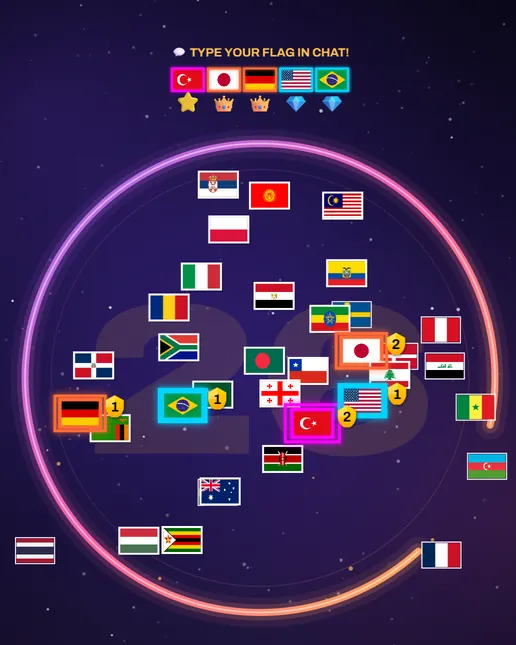
    Turkey gets +1 support. Supports from all viewers add up, and every flag in a message counts: 🇹🇷🇹🇷🇹🇷 is 3 supports.

  • You send: 🇧🇷

    Brazil gets +1 support. At 10 supports in the same round it reaches Diamond 💎 and gets its first shield.

The FlagsBattle arena with chat support: glowing supported flags with their shield counts and the TYPE YOUR FLAG IN CHAT! panel
In the game, a supported flag glows and shows how many shields it has, and the TYPE YOUR FLAG IN CHAT! panel lists the countries with a tier. A shield saves the flag once when it falls through the gap: it bounces back in, and the game shows "🛡️ Turkey SAVED!"

Tiers in one round

  • Diamond 💎 at 10 supports: 1 shield
  • Crown 👑 at 50 supports: 2 shields
  • Legend ⭐ at 100 supports: 3 shields
  • Champion 🏆 at 500 supports: 5 shields. Every 500 more refills used shields, up to 5.
  • Each tier also makes the flag faster, stronger and bigger.
  • Supports, tiers and shields go back to zero when a new round starts.

Chat rules still apply

The game counts every flag emoji you send. The channel's own chat rules still apply, though: slow mode can hold your messages back, and the streamer's moderators can time out anyone who floods the chat.

Game modes

FlagsBattle has three game modes. Each round starts after a 10-second countdown. The last flag in the ring wins the round, and the first country to win 3 rounds is the champion.

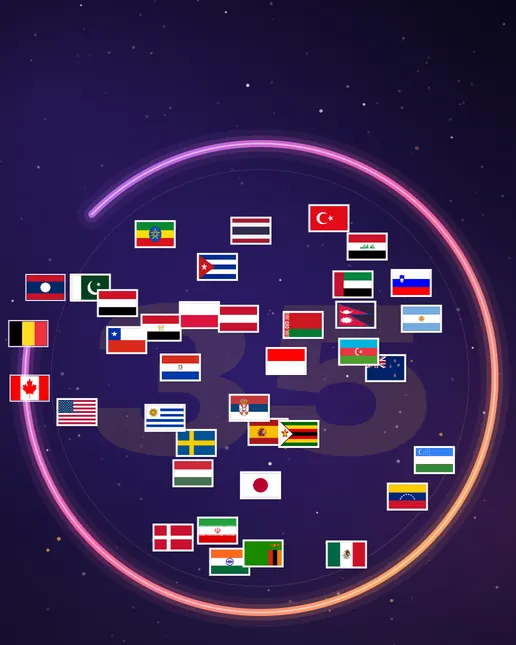
Normal mode in the game: flags in the turning ring, two of them slipping out through the gap

Normal mode

The classic mode. The ring spins with a gap in it, and a flag that falls through the gap is out unless it has a shield. From 20 seconds the gap widens and the ring spins faster. At 30 seconds the game calls TIMEOUT! and opens the gap wide.
  • Gap elimination
  • First to 3 wins
  • Battle royale
  • Pure physics
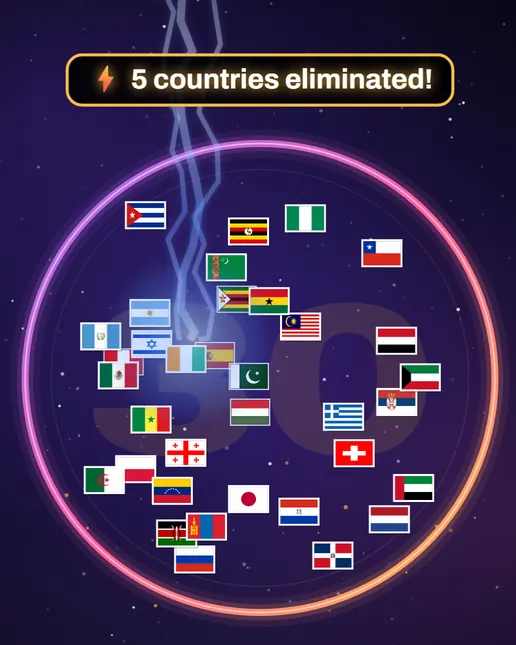
Lightning mode in the game: a strike lands in the closed ring and the arena reads 5 countries eliminated

Lightning mode

The ring is closed, so no flag falls out. Instead, random lightning strikes eliminate flags, and shields do not protect against lightning. The last flag left wins.

  • Lightning strikes
  • Random selection
  • High intensity
  • Shields don't help
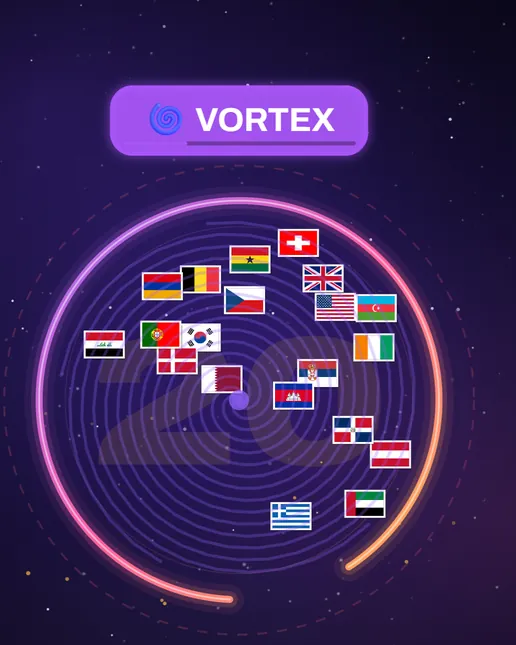
Chaos mode in the game: the Vortex event swirls the flags in a smaller ring

Chaos mode

Maximum mayhem! The arena shrinks, random events trigger constantly - vortexes pull flags, wind pushes them around, speed bursts occur, and chaos spins everything. Expect the unexpected!

  • Vortex pull
  • Wind force
  • Speed burst
  • Center pull
  • Chaos spin

If a Normal or Chaos round lasts 2 minutes and a supported flag (one with a tier) is still in the ring, the game calls HYBRID MODE! Lightning then strikes every 3 seconds, and 70% of the strikes aim at supported flags.

Special commands

While most interaction happens through flag emojis, there's one special text command available:

KKTC

Support Northern Cyprus

Northern Cyprus has no flag emoji, so typing KKTC in the chat gives it +1 support instead. It does not add Northern Cyprus to the arena: it only helps when the streamer has it in the game. This is the only text command.

Strategy and tips

Want to give your country the best chance? Here are some strategies from experienced players:

Team up
Find other viewers supporting your country in chat. Supports from everyone add up, so the more of you there are, the faster your flag climbs the tiers.
Start early
Supports only count in the current round. The sooner your flag reaches 10 supports, the sooner it has a shield.
Keep going
After Champion, every 500 more supports refill the shields your flag has used, up to 5.
Know the mode
Shields only save flags from the gap. They do not help in Lightning mode, and in Hybrid mode most strikes aim at supported flags.
Stay positive
Win or lose, it's all about fun! Chat with other viewers, celebrate good plays, and enjoy the chaos together.
Use mobile
The YouTube mobile app makes it easy to send emojis quickly. Keep your flag emoji in your recent list for fast access!

Remember the rules

To keep FlagsBattle fun for everyone, please follow these basic rules:

Do's

  • Send flag emojis to support your country
  • Be respectful to all participants and countries
  • Have fun and enjoy the competition
  • Celebrate wins gracefully and accept losses sportingly

Don'ts

  • Flood the chat (the streamer's moderators may time you out)
  • Use hate speech or insult countries/people
  • Share personal information
  • Use bots or automated tools

For streamers: your YouTube API key

FlagsBattle reads your live chat with your own free YouTube API key. The game runs and streams without one; the key is needed for chat play, so your viewers' flag emojis become supports. Setting it up takes about five minutes and you only do it once.

Open Google Cloud Console
  1. Create a Google Cloud project

    Open Google Cloud Console, sign in with your Google account and create a project with any name, for example "FlagsBattle". Make sure it is selected at the top of the page.

  2. Enable YouTube Data API v3

    In the API Library, choose YouTube Data API v3 and click Enable.

  3. Create an API key

    Go to Credentials → + Create credentials → API key and copy the key. It starts with AIza. Recommended: open the key, choose Restrict key under API restrictions and tick only YouTube Data API v3.

  4. Enter it in FlagsBattle

    Open the app and, in the right panel under Tools, click YouTube API (the key icon). Paste the key, click Save & Apply, then Test Connection. Both lines should show ✅. The app remembers the key.

  5. Connect your live stream

    In the app's left panel, under the Chat switch, paste the link of your YouTube live stream into the Paste your YouTube live link box and click Connect. The status should read Connected, reading chat. Every step of the setup: the streamer guide.

Good to know

  • It is free and needs no credit card.
  • Google gives each project a daily quota. It resets at midnight Pacific Time.
  • A key's free daily quota covers roughly one hour of live chat. For longer streams you can request a higher quota from Google.

Keep your key private

Never share your key or show the settings window on stream. If it leaks, delete it under Credentials and create a new one.

Fair Play & Technical Notes

All flags follow the same physics rules. Each stream is run by its streamer, who moderates the chat and can time out anyone who abuses bugs, floods the chat or provokes others. The streamer can also turn on Creator mode, which protects the countries they pick.

Representation & Content Note: FlagsBattle does not make political/ideological evaluations regarding countries, cultures or communities. This is a game and simulation experience.

Ready to play?

Jump into the action and support your country in the next battle!